The best single board computer for emulation is not automatically the board with the highest CPU clock or the most RAM. Emulators translate the behavior of one hardware architecture into another, often in real time. That workload depends on fast single-threaded CPU execution, a well-supported GPU driver, low-overhead graphics APIs, sustained cooling, and an operating-system image that integrates the right emulator versions and controller stack.
For most users in 2026, the Raspberry Pi 5 is the best overall choice because it balances performance with mature software support and a large accessory ecosystem. RK3588 boards such as the Orange Pi 5 Plus and ROCK 5B offer more raw Arm compute headroom, but usually require more attention to drivers, images, and board-specific configuration. Industrial boards such as Conclusive Engineering's WHLE-LS1 address a different interpretation of emulation: headless software testing, network-lab workloads, and production-oriented embedded development rather than a television-connected retro console.
The correct choice therefore depends on the workload, required I/O, setup effort, and whether predictable operation matters more than peak capability.
We make custom electronic hardware tailored to your needs
Order a Custom Single Board ComputerWhat Makes the Best Single Board Computer for Emulation?
A single-board computer integrates the processor, memory, storage interfaces, and I/O on one PCB. Most current SBCs use an ARM system-on-chip (SoC) that combines CPU and GPU resources. Emulation stresses this architecture differently from a typical Linux desktop or media player.
CPU Performance and Instruction Translation
Many emulators use dynamic recompilation: blocks of guest CPU instructions are translated into instructions the host ARM CPU can execute. Strong single-core performance, branch prediction, cache behavior, and memory latency can matter more than the total number of cores. Additional cores still help with renderer threads, audio, background services, and emulators designed for parallel execution, but eight slower cores do not guarantee better results than four faster and better-supported ones.
GPU APIs and Driver Quality
The GPU must do more than expose a high theoretical throughput figure. Dolphin, PPSSPP, AetherSX2 derivatives, RetroArch cores, and other emulators depend on correct OpenGL ES or Vulkan behavior. A board with stable Mesa or vendor drivers and a tested Vulkan path can outperform nominally faster hardware running an immature image. Driver regressions may produce missing effects, frame pacing problems, or crashes even when average frame rate looks acceptable.
Thermals, Power, and Sustained Clocks
Emulation creates long combined CPU and GPU loads. A brief benchmark may finish before an uncooled SoC throttles; a real play session will not. The enclosure, heatsink, fan curve, ambient temperature, and power supply are therefore part of the performance specification. Undervoltage can look like an emulator bug because it causes clock reductions, USB resets, or storage errors.
RAM and Storage
For most retro-emulation distributions, 2 GB is workable and 4 GB is the practical default. Moving from 4 GB to 8 GB rarely improves frame rate unless the system also runs desktop services, high-resolution texture packs, or memory-heavy native games. Storage affects boot time, library scanning, artwork, and reliability more than emulator throughput. A high-quality microSD card is adequate for small libraries; eMMC or NVMe is preferable for large disc-based collections and frequent writes.
Best Single Board Computers for Emulation Compared
|
Board |
Core hardware |
Software and integration |
Best fit |
|
WHLE-LS1 |
NXP Layerscape; up to 4× Cortex-A72 at 1.8 GHz or 8× Cortex-A53; ECC DDR4 |
Linux, Yocto, Buildroot, Ubuntu; no gaming image or display output listed |
Headless testing, network labs, and industrial edge development |
|
Raspberry Pi 5 |
4× Cortex-A76 at 2.4 GHz; VideoCore VII; Vulkan 1.3 |
Dedicated Batocera image; broad case, cooler, controller, and community support |
Best overall; 4 GB is the practical default |
|
Orange Pi 5 Plus |
RK3588; 4× Cortex-A76 + 4× Cortex-A55; Mali-G610 |
Batocera image available; board-specific Linux and driver work may be required |
High Arm performance potential and NVMe-focused builds |
|
ROCK 5B / 5B+ |
RK3588; Mali-G610; Vulkan support; NVMe |
Batocera image available; strong official hardware documentation |
Advanced users who want RK3588 performance and expansion |
|
ODROID-N2+ |
S922X; Cortex-A73/A53; Mali-G52; large passive heatsink |
Dedicated Batocera image and established console-style deployments |
Quiet, stable build for older systems; less top-end headroom |
|
Raspberry Pi Zero 2 W |
4× Cortex-A53 at 1 GHz; 512 MB RAM |
Dedicated Batocera image; limited I/O requires adapters or a hub |
Tiny, low-cost 8/16-bit and selected PlayStation-era build |
1. WHLE-LS1: Industrial SBC for Headless Emulation and Testing
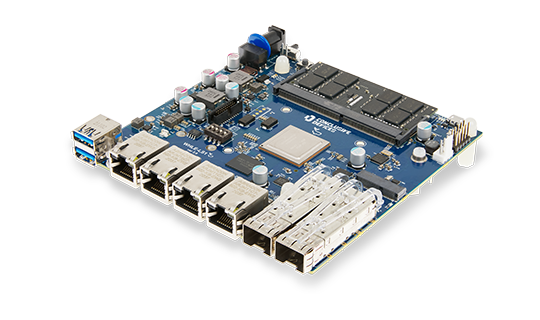
Conclusive Engineering's WHLE-LS1 is not designed as a plug-and-play retro-gaming board. Its specifications focus on industrial computing and networking: NXP Layerscape variants provide either Cortex-A72 or Cortex-A53 cores, the SO-DIMM socket supports up to 32 GB of ECC DDR4, and the board includes eMMC, two NVMe-capable M.2 Key-M slots, four Gigabit Ethernet ports, and two 10 Gigabit SFP+ interfaces. Supported software includes Linux, U-Boot, Yocto, Buildroot, Ubuntu, and FreeBSD on request.
That profile is relevant when emulation means headless software compatibility testing, repeatable embedded-Linux experiments, or network-oriented lab workloads rather than console gaming. ECC memory, fast storage, high-speed networking, and long-running software support can matter more than a display GPU in those environments. Conversely, the published WHLE-LS1 specification does not list HDMI output, a display-oriented GPU, or a dedicated Batocera/Recalbox image. It should therefore not be ranked against Raspberry Pi 5 or RK3588 boards for a television-connected gaming build.
2. Raspberry Pi 5: Best SBC for Emulation Overall
Raspberry Pi 5 combines a 2.4 GHz quad-core Cortex-A76 CPU with a VideoCore VII GPU that officially supports OpenGL ES 3.1 and Vulkan 1.3. Its advantage is not just silicon. Batocera publishes a dedicated Raspberry Pi 5 image, and the board benefits from a mature ecosystem of cases, active coolers, power supplies, controller guides, and troubleshooting information.
Use active cooling for sustained emulator workloads; Raspberry Pi itself states that the board performs best with it. Pair the board with a compliant 5 V/5 A USB-C supply. A 4 GB model provides comfortable headroom without paying for RAM that most emulators will not use. Expect excellent coverage of 8-bit and 16-bit consoles, arcade platforms, PlayStation, and many Dreamcast and PSP titles. GameCube and PlayStation 2 results are game- and emulator-dependent, so treat them as a tunable upper tier rather than guaranteed full-library support.
3. Orange Pi 5 Plus and ROCK 5B: Best Raw ARM Performance
The Orange Pi 5 Plus and ROCK 5B use Rockchip’s RK3588, with four Cortex-A76 performance cores, four Cortex-A55 efficiency cores, and a Mali-G610 GPU. These boards offer more aggregate CPU resources than Raspberry Pi 5 and support fast NVMe storage. Batocera currently publishes board-specific images for Orange Pi 5 variants and ROCK 5B, which substantially lowers the initial setup barrier.
However, RK3588 emulation remains more sensitive to image version, GPU driver path, emulator build, and board-specific patches. Advanced users may obtain better results in demanding GameCube, Wii, and PlayStation 2 workloads, but raw SoC capability does not make every title faster or more accurate. Choose these boards when you can validate the exact emulator and game set you intend to deploy, and when NVMe, 2.5 GbE, or additional I/O also matters.
4. ODROID-N2+: Best Quiet and Established Alternative
ODROID-N2+ uses an Amlogic S922X with Cortex-A73 and Cortex-A53 CPU clusters plus a Mali-G52 GPU. It is older than Raspberry Pi 5 and RK3588 boards, but its large integrated heatsink and long history in console-style systems remain useful. Batocera provides a dedicated image, and Hardkernel documents eMMC support, four USB 3.0 ports, Gigabit Ethernet, and thermal behavior.
It is a sensible choice for a quiet build focused on arcade, 8-bit and 16-bit consoles, PlayStation, Dreamcast, and PSP rather than maximum sixth-generation coverage. Hardkernel notes that the highest overclock can still throttle in warm ambient conditions without a fan, so passive cooling should not be confused with unlimited thermal headroom.
5. Raspberry Pi Zero 2 W: Best Compact Budget Option
Raspberry Pi Zero 2 W provides four Cortex-A53 cores at 1 GHz and 512 MB of RAM in a 65 × 30 mm format. Batocera offers a dedicated image. It is well suited to compact installations for Atari, NES, SNES, Mega Drive/Genesis, PC Engine, handheld systems, and many PlayStation titles. It is not the right platform for demanding PSP, Dreamcast, GameCube, or PlayStation 2 emulation.
The board’s limited ports also affect the real bill of materials: a USB OTG hub, mini-HDMI cable, power supply, enclosure, and storage may cost as much as the board itself. Select it for size and simplicity, not as a low-cost substitute for Raspberry Pi 5 performance.
How to Choose an SBC by Console Generation
8-bit, 16-bit, handheld, and early arcade systems: Raspberry Pi Zero 2 W is sufficient for a compact build; any faster board provides UI and shader headroom.
- PlayStation, Nintendo 64, Saturn, and later arcade systems: Raspberry Pi 5, ODROID-N2+, or RK3588 boards are safer choices because individual cores and renderers vary.
- Dreamcast and PSP: Raspberry Pi 5 is the best balanced default; RK3588 boards offer additional tuning headroom.
- GameCube, Wii, and PlayStation 2: use Raspberry Pi 5 only with title-specific expectations; choose RK3588 for greater Arm performance potential.
- Broad, low-maintenance sixth-generation compatibility: consider an x86 mini PC instead. It is outside the usual SBC category, but often provides a more predictable emulator and graphics-driver environment.
- Headless system or network-oriented emulation: consider an industrial platform such as WHLE-LS1 when ECC memory, NVMe, multiple Ethernet interfaces, and a maintained Linux or Yocto stack matter more than HDMI and a gaming-focused GPU.
Console generation is only a starting point. Compatibility differs by title, region, emulator core, graphics backend, internal resolution, shader set, and accuracy setting. Build a test matrix from the actual games and peripherals that matter rather than relying on a single showcase video.
Best Practices for an SBC Emulation Build
- Define the workload first. List target systems, difficult titles, required resolution, controller count, and acceptable frame-time variance.
- Choose the software image before the board. Confirm that the current Batocera, Recalbox, or Linux image supports the exact board revision and exposes hardware-accelerated graphics.
- Use validated power and cooling. Monitor clock, temperature, undervoltage, and frame time during a 30- to 60-minute combined CPU/GPU session.
- Start at native resolution. Increase internal resolution, anisotropic filtering, shaders, and texture packs only after establishing a stable baseline.
- Prefer wired controllers during validation. Bluetooth latency and reconnection behavior can obscure whether a problem comes from the emulator or the input stack.
- Keep configuration under version control. Record OS image, kernel, GPU driver, emulator version, renderer, per-game settings, and BIOS hashes.
- Use legally obtained software. Dump games and BIOS files you are entitled to use, and check the rules applicable in your jurisdiction.
Common Mistakes
- Buying RAM instead of performance. An 8 GB or 16 GB model does not automatically emulate better than a 4 GB version of the same board.
- Ignoring GPU drivers. A powerful SoC with an unstable Vulkan path may deliver worse compatibility than a slower, well-supported platform.
- Testing only average FPS. Frame pacing, audio underruns, input latency, and shader compilation stutter also determine playability.
- Running without sustained thermal testing. A five-minute benchmark can hide throttling that appears during a normal session.
- Treating a platform label as a guarantee. “PS2 capable” may mean selected titles with reduced resolution, speed hacks, or a specific emulator build.
- Using random prebuilt images. Unmaintained distributions can contain outdated emulators, insecure services, or unclear licensing.
Why This Matters Beyond Retro Gaming
An emulation system is a compact stress test for embedded product integration. It combines CPU scheduling, GPU drivers, audio timing, USB and Bluetooth input, storage, video output, thermals, and power integrity. The same engineering disciplines apply to interactive kiosks, industrial HMIs, medical displays, and edge appliances.
A platform such as the WHLE-LS1 shows how production priorities can shift toward ECC memory, NVMe expansion, high-speed networking, maintained BSPs, and secure, repeatable software stacks. Teams moving from a development board to a production platform must also manage boot time, lifecycle, security, update strategy, and reproducible builds. Conclusive Engineering supports this transition through custom single-board computer development and Linux BSP development. The underlying work is closely related to embedded systems programming: hardware-aware software must behave predictably on a specific target.
FAQs About the Best Single Board Computer for Emulation
Is Raspberry Pi 5 the best SBC for emulation?
It is the best overall choice for most users because it combines strong CPU performance, Vulkan support, mature Batocera support, and a large accessory and troubleshooting ecosystem. RK3588 boards can offer more performance potential but normally require more platform-specific work.
How much RAM does an emulation SBC need?
Two gigabytes can run many dedicated emulation distributions, while 4 GB is the practical default. More RAM helps with desktop multitasking, native games, and large texture packs, but usually does not increase emulator frame rate by itself.
Can Raspberry Pi 5 emulate PlayStation 2 and GameCube?
It can run selected titles with suitable emulator builds and settings, but it does not provide uniform full-speed compatibility. Treat results as game-specific and validate the exact titles you care about.
Is Orange Pi 5 Plus better than Raspberry Pi 5 for emulation?
Orange Pi 5 Plus has more raw CPU resources and an RK3588 GPU, so it can provide more headroom in demanding workloads. Raspberry Pi 5 generally offers a more mature and predictable software ecosystem. The better choice depends on whether peak potential or integration simplicity matters more.
Does NVMe storage improve emulation performance?
NVMe improves booting, artwork scanning, file transfers, and large-library management. It rarely increases frame rate because most classic game images do not stream data fast enough to make storage the bottleneck.
Which emulation OS should I use?
Batocera is a strong appliance-style default because it publishes images for the boards compared here. Recalbox is also suitable on its supported hardware, while a general Linux distribution offers the most control at the cost of more setup and maintenance.
Can WHLE-LS1 be used for emulation?
WHLE-LS1 is better suited to headless software testing, network-lab workloads, and industrial embedded development than retro-console gaming. Its strengths include Cortex-A72 or Cortex-A53 processor options, ECC DDR4, NVMe, extensive Ethernet, and Linux or Yocto support. Its published specification does not list HDMI output, a display-oriented GPU, or a dedicated gaming distribution.
Do I need active cooling?
For Raspberry Pi 5 and most RK3588 builds, active cooling is strongly recommended for repeatable performance. A large passive heatsink may be sufficient on some boards, but validate sustained clocks at the expected ambient temperature.
Conclusion
Whichever board you select, test the complete system rather than the SoC in isolation. Power delivery, cooling, GPU drivers, controller behavior, emulator versions, and per-game configuration determine whether a platform is merely capable of launching a title or can run it reliably for hours.